Palma Launcher · Android

Less on your screen. More in your day.

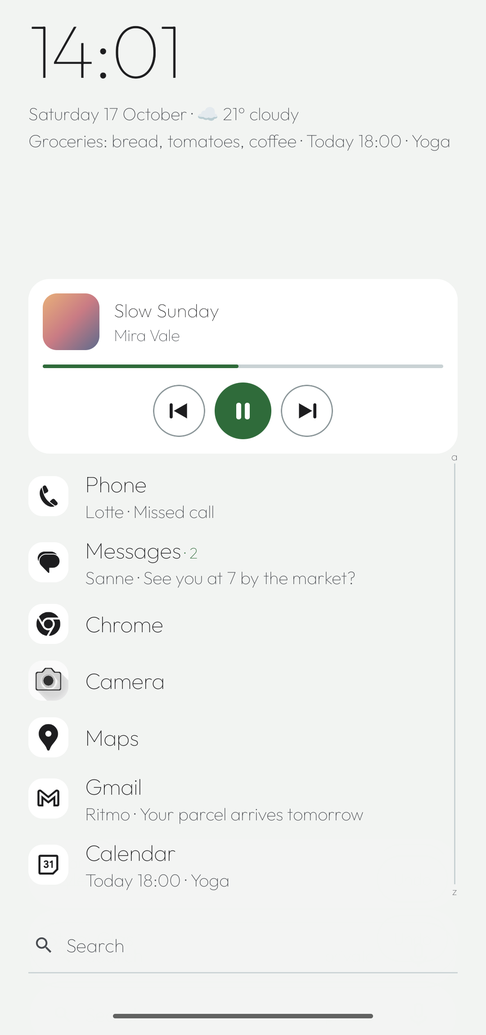
A home screen that stays quiet until you need something. Seven favourites at your thumb, the rest one swipe away. No ads, no account.

Available now as an APK for testers. Android 10 or newer.

No adsNo accountSeven languagesMade for foldables
Palma

Three rules, no exceptions.

Every screen in Palma follows them. That is why it feels calm, even when a lot is going on.

01

Thumb zone first

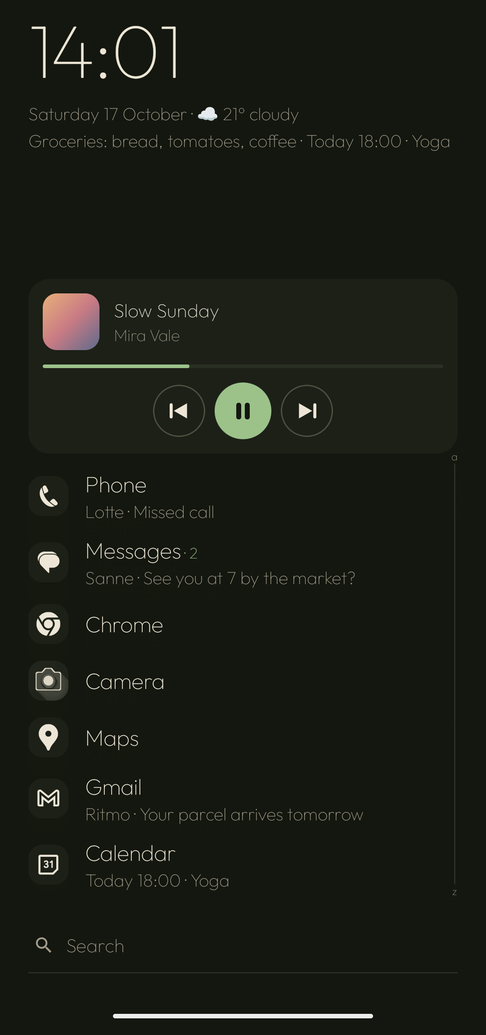
Everything you tap sits in the lower half. At the top only clock, date and weather.

02

Mirrors everywhere

Left- or right-handed: list, alphabet, search bar and buttons sit on the side of your hand.

03

Context over decoration

A panel appears only when it has something to say. No notification, no line.

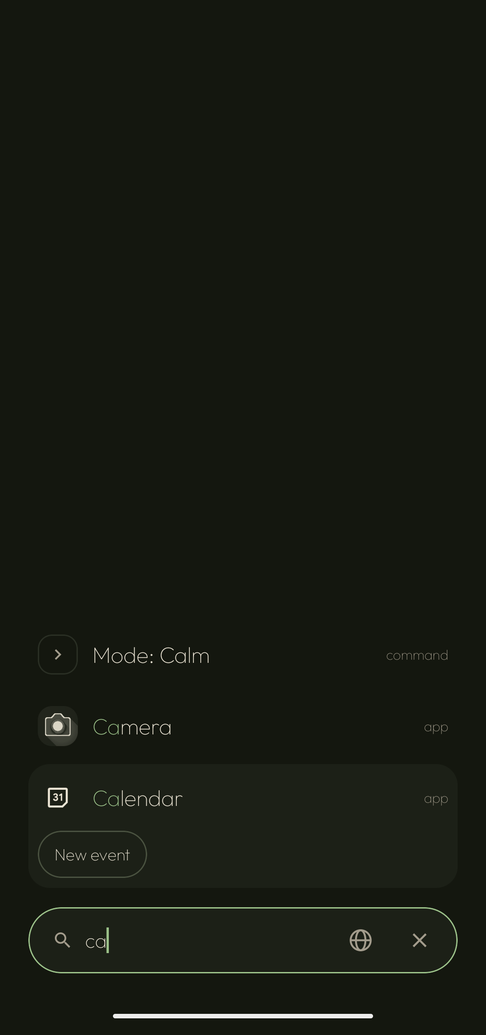
Search at your thumb.

Type two letters and it is there. The best match closest to your thumb, Enter opens it.

  • Apps, folders, contacts, events and settings
  • Calculates, converts, dials a number, opens an address
  • Typos allowed: "wahtsapp" finds WhatsApp
  • Type > for commands: >focus 30m, >note milk
Your day, not your apps.

Workspaces with their own favourites, a time of day or a Wi-Fi network. Work by day, calm in the evening. Switches by itself.

  • Notifications as one line next to the app: swipe to reply or snooze
  • A daily limit per app, a focus session, a sleep mode
  • Gestures you choose, up to locking the screen
  • Folders, widgets, app pairs and panels you arrange

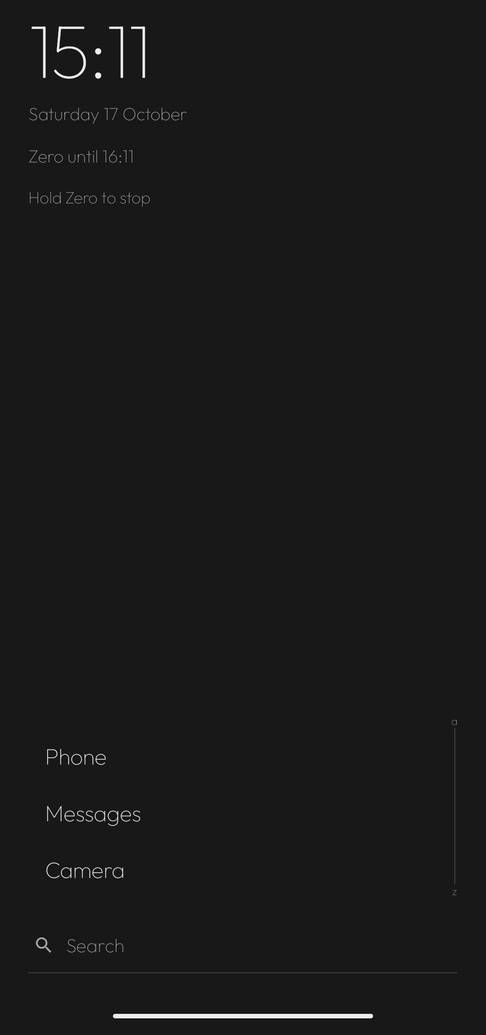
Zero, for when you want nothing for a while.

Just calls, messages and camera. Everything in grey, Palma offline, for as long as you choose. Afterwards everything is back the way it was.

  • An hour, until tonight or until you turn it off
  • One important app added, if you like
  • Do not disturb if you want, hold to stop

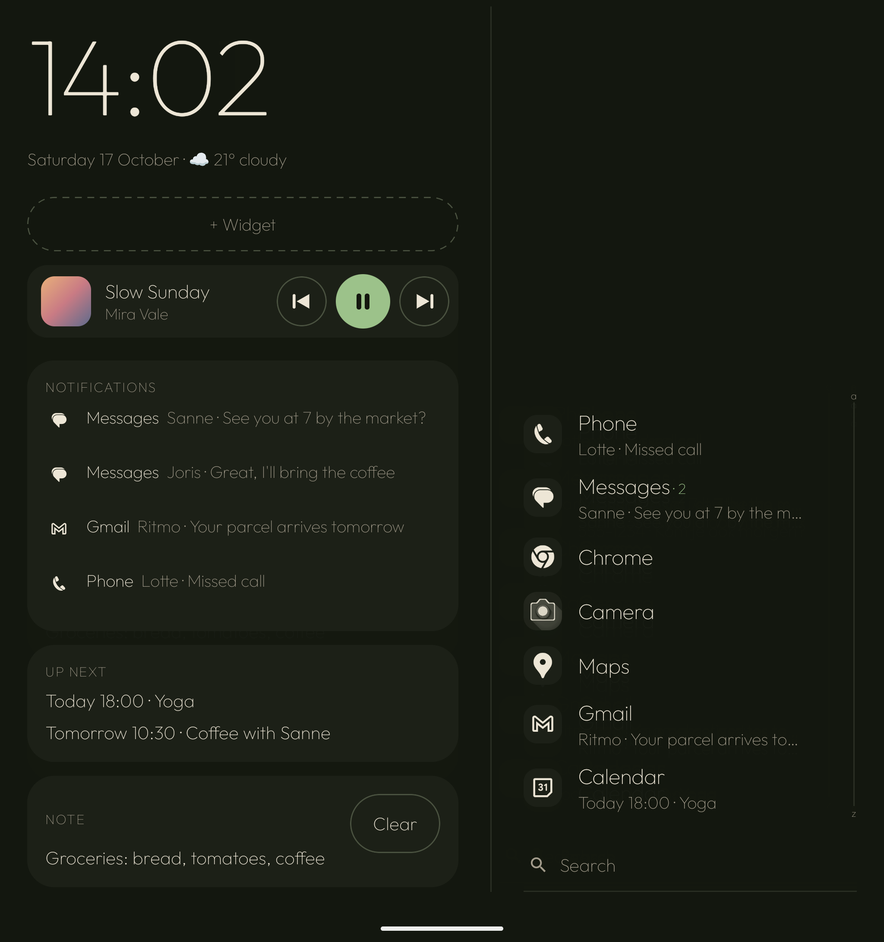
Made for the foldable.

Closed: the list at your thumb. Open: next to it where you were, your notifications and what is next. Half open on a table: look at the top, control at the bottom.

  • Works on every Android phone
  • Foldables get the extra postures
  • Samsung DeX too, with a keyboard

Twelve styles, or entirely your own.

Pick one, slide your own colours, save it and share it as a style code. A style changes colours and type, never where things are.

Your day stays yours.

No account, no ads, no server of its own. Only what you turn on or ask for goes online: the weather (with a rounded location), Smart, news from your own sources and answers from Wikipedia. Palma asks for a permission only when you turn a feature on, and explains why.

Free. Pro for those who want more.

The core is free and stays free. Pro is for taste and extras, and supports the work of one maker.

Free

€ 0forever
  • Favourites, folders, contacts
  • Search with calculator and converter
  • Notifications with swipes, calendar, weather
  • Three styles, left- or right-handed
  • Gestures, widgets, panels, fold postures
  • Note, quick menu, backup

Pro

€ 9.99a year, or € 29.99 once
  • All twelve styles, editor and style codes
  • More workspaces, with schedule, Wi-Fi and own style
  • Focus: daily limits, sessions, sleep mode
  • App pairs, own icons and icon packs
  • Smart order and Smart (AI)
  • Everything that comes next

What was added.

Every version also shows up as a card in the app (listed here in Dutch).

2.11.1

  • Slogan "Kalm in je palm." (en: "Calm in your palm.", es: "Calma en tu palma.") op het welkomstscherm en in de gids.
  • Feedback geven onder Over en back-up: een mail naar hallo@palmalauncher.com met versie, Android, toestel en taal al ingevuld; er wordt niets vanzelf verstuurd.

2.11.0

  • Zero uitgebreid: vaste tijden en afspraken met een woord, rustig terugkomen ("2 uur in Zero · 6 meldingen"), een tegel in Snelle instellingen en een gebaar, op de vouwtelefoon "alleen op het buitenscherm" of "dicht is Zero", een nachtklok in tabletop, ademhalen voor andere apps, een weekregel in Vandaag en "Even Zero" bij het rustmoment. De onboarding noemt Zero, met een voorbeeld.
  • Voorspellend terug staat weer aan; terug op een subpagina gaat naar het hoofdmenu van de sheet.
  • Palma-iconen: zware symbolen worden een omtrek en alles is even groot, ook bij de eigen iconen van Samsung. Widgets krijgen de grootte die ze vragen; de bovenrand van de favorieten loopt zacht over.
  • Toegankelijkheid: kleine knoppen minstens 44 dp, uitklaprijen met uitgeklapt/ingeklapt voor TalkBack, labels voor media, zoekrijen, antwoorden en Zero. Sportherkenning niet meer bij "credit score" of "live wallpaper".
  • Vertalingen nagelopen in het Duits, Spaans, Frans, Italiaans en Portugees.

2.10.0

  • Zero: Palma op z'n kaalst. Klok, datum en alleen bellen, berichten en camera (plus één app naar keuze), alles in grijs, geen meldingsregels, media, panelen of widgets, en Palma gaat zelf offline. Een uur, tot vanavond of tot je het uitzet; desgewenst Niet storen. Stoppen door Zero vast te houden; daarna staat alles zoals het was. Ook `>zero`, `>zero 1h`, `>zero uit`.
  • Zoeken weet meer: "ajax uitslag" of "a vs b" geeft één rij naar de live uitslag in je zoekmachine; "nieuws" toont koppen uit bronnen die jij kiest (NOS, BBC, Guardian, Tagesschau, El País, Le Monde, ANSA, Público, Tweakers of een eigen RSS-adres), ook als paneel; "wie is" of "wat is" geeft een kort antwoord van Wikipedia. Alleen als je erom vraagt. In Nerd: `news` en `wiki`.
  • Rustigere Palma-iconen: apps zonder monochroom icoon krijgen een silhouet of omtrek in de tekstkleur in plaats van een grijs blok.
  • Instellingen: de gekozen optie valt duidelijk op, keuzes lopen door in plaats van achter de rand, gebaren als rij met uitklapbare keuzes, lijnpictogrammen in het hoofdmenu, seconden en statusregel tonen je eigen keuze ook als Palma zuinig is.
  • Afwerking: mediakaart over de volle breedte met strakke knoppen en de hoes in tabletop, meldingen niet meer dubbel of afgekapt, Nerd `ls` met Enter, alfabet met a en z weer zichtbaar, notities met juiste herinneringen en lijstnamen, Ctrl+/ toont de sneltoetsen. Android 16 (targetSdk 36).

2.9.0

  • Widgets opnieuw: laden betrouwbaar (met "Tik om opnieuw te laden" als een widget hangt), kaarten in Palma-stijl of eigen stijl, formaat en halve breedte per widget, snel toevoegen met voorbeelden vanuit een lege plek, stapels en een slimme stapel, en een widget-menu bij vasthouden.
  • Doorgaan waar je was: snelkoppelingen, verder luisteren, gewoontes, oude items verouderen, verbergen of vastzetten via vasthouden, en een regel op het dichte scherm.
  • Zoekgeschiedenis met eigen instellingen (bewaren, wissen, per soort) en privé zoeken dat niet meetelt in Recent.
  • Ideeën: werkruimte tijdens afspraken, een rustmoment, zuinig bij lage batterij, ochtend- en avondstand, snel wisselen tussen apps en werkruimtes.
  • Linkshandig: de lay-out spiegelt, tekst leest normaal; Calm blijft links in de onboarding. Rijen zijn dicht tijdens vegen, zodat tekst niet meer door elkaar loopt.
  • Favorieten worden nooit samengedrukt door widget en kaarten: de lijst scrollt, en vegen blijft een gebaar als er niets te scrollen is.

What people ask first.

Does Palma work on my phone?

On any Android phone running Android 10 or newer. Foldables get the extra postures.

Can I use my icon pack?

Yes. Any icon pack that works with Nova, ADW, Apex or Lawnchair works with Palma. Or pick an icon shape: round, squircle, rounded.

Where does my data go?

It stays on your phone. Something only goes out when you ask for it: the weather (with a rounded location), your news sources, a who-or-what question to Wikipedia and Smart over the internet. No account, no server of our own. A backup is a text file you keep yourself.

What does it cost?

The core is free. Pro is € 9.99 a year or € 29.99 once, through Google Play.

I want my old home screen back.

Settings › Apps › Default apps › Home app. You do not have to uninstall Palma, but you may.

Calm in your palm.

Install Palma and pick your thumb. The rest follows.